
Introduction
A school can spend heavily on a beautiful website and still manage admissions through inboxes, spreadsheets and phone notes.
The gap usually appears immediately after a parent clicks “Enquire Now.”
The website form sends an email. Someone copies the details into Excel. A counsellor writes follow-up notes elsewhere. Documents arrive on WhatsApp. When the student is finally admitted, another employee enters the same information again into the school ERP.
School website + ERP integration is about removing those hand-offs.
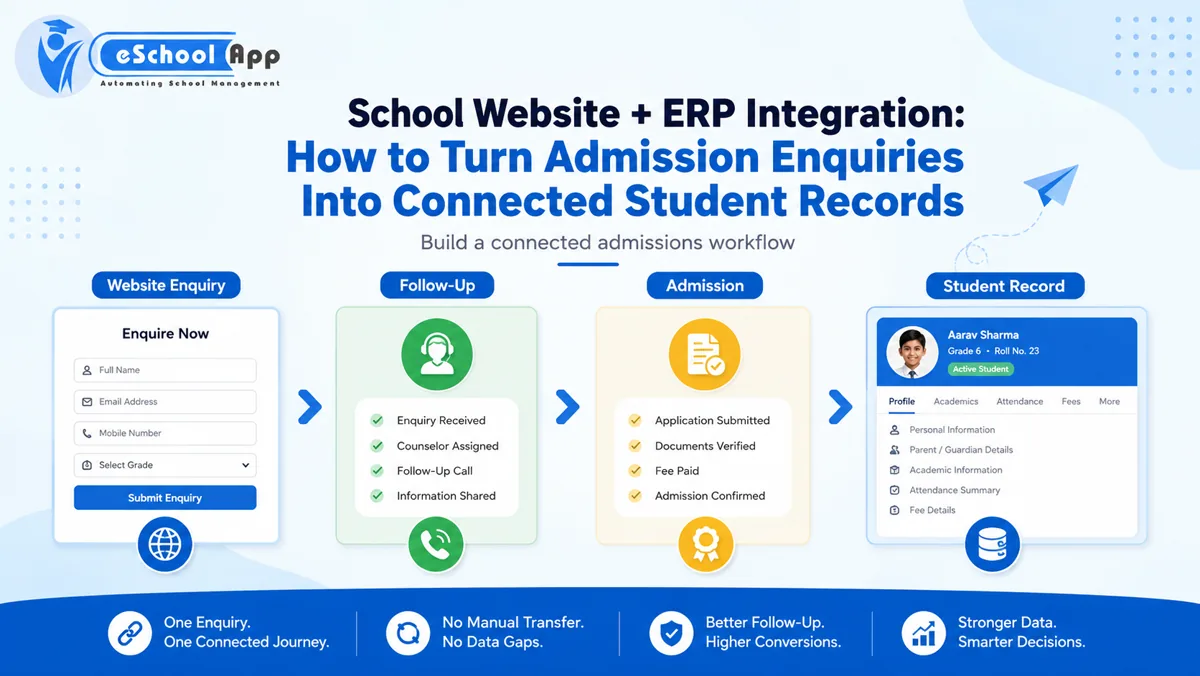
The goal is a connected journey:
Website enquiry → follow-up → application → verification → admission → student record.
This article explains how to design that flow without turning the school website into an overloaded ERP screen.
On this page
- Why Website Leads Get Lost
- What the Website Should Collect
- Create One Enquiry Record
- From Enquiry to Application
- Convert the Applicant Into a Student Without Retyping
- Connect Admission Source to Marketing Decisions
- Use Automation Carefully
- Privacy and Security Considerations
- Technical Questions for Your Website and ERP Teams
- How eSchoolApp Can Fit the Admission Journey
- Frequently Asked Questions
- Final Thoughts
Why Website Leads Get Lost
Most admission enquiry problems are process problems rather than traffic problems.
Common gaps include:
- No unique enquiry record
- Multiple staff calling the same parent
- No lead-source tracking
- Follow-ups stored in personal notebooks
- Website enquiries mixed with general contact emails
- No visibility of pending applications
- Duplicate student data after admission
- Documents arriving through unstructured channels
When admissions are busy, these small gaps become expensive because management cannot see how many enquiries are active or why families drop out.
What the Website Should Collect
Collect enough information to start the conversation, not every detail needed for final admission.
A first enquiry form may include:
- Parent/guardian name
- Student name
- Class/grade interested in
- Phone number
- Email where relevant
- Academic year
- Branch/campus if applicable
- Source/campaign where available
- Short message
Avoid asking for sensitive or extensive identity documents at the enquiry stage unless there is a clear reason. More fields usually reduce form completion and increase privacy responsibility.
Create One Enquiry Record
When the form is submitted, the information should create or update a single enquiry in the admissions workflow.
The system should help staff see:
- When the enquiry arrived
- Which source/campaign generated it
- Who owns the follow-up
- Latest contact attempt
- Next action date
- Interested class/campus
- Current stage
- Notes and relevant documents
Deduplication is important. If the same parent submits two forms, the school should not automatically create two unrelated leads without a review rule.
From Enquiry to Application
Not every enquiry should immediately become a full student record.
Keep prospective-family data in the admission pipeline until the family actually applies. When they move forward, collect the additional information required for the application and document process.
This separation keeps the operational student database clean while still preserving admission history.
A useful stage model might be:
New enquiry → Contacted → Visit/counselling → Application started → Documents pending → Application complete → Offered/approved → Admitted → Closed/not proceeding.
Schools can use different stage names; the important point is that everyone uses the same ones.
Convert the Applicant Into a Student Without Retyping
The biggest payoff comes at admission.
Once the application is approved, validated information should become the new student record instead of being re-entered from scratch.
That reduces duplicate work and creates continuity between the promises made during admissions and the operational record used for fees, attendance, class allocation and communication.
Before enabling automatic conversion, define which fields are trusted and which require final verification.
Connect Admission Source to Marketing Decisions
Website integration also improves marketing measurement.
If enquiry source is captured consistently, management can compare:
- Organic search
- Google Ads
- Social media campaigns
- Referral
- Walk-in
- Education portals
- Events/open houses
Do not stop at number of leads. Compare lead quality and admission conversion by source.
This helps the school understand which marketing channels produce real enrolments rather than only form submissions.
Use Automation Carefully
Automation can reduce follow-up gaps, but admissions should not feel robotic.
Useful automations include:
- Immediate acknowledgement after an enquiry
- Task reminder when a follow-up is overdue
- Document checklist reminders
- Visit/appointment confirmations
- Status notification after an application step
Important conversations – fee discussions, admissions decisions, special requirements – should still be handled by people.
Privacy and Security Considerations
Website enquiry forms collect personal data, often relating to children.
Use secure HTTPS forms, collect only necessary data, show an appropriate privacy notice, restrict who can see applicant information and avoid sending complete admission records through unsecured email threads.
If the website uses third-party form, analytics or advertising tools, understand what data those services receive.
Link this article to the September school data privacy guide for a deeper checklist.
Technical Questions for Your Website and ERP Teams
Before asking developers to “integrate the website,” define the direction of data and the event that triggers it.
Ask:
- Does the website push enquiries to the ERP in real time?
- Is there an API or secure webhook?
- What happens if the ERP is temporarily unavailable?
- How are duplicates detected?
- Which fields are mandatory?
- Can UTM/source data be retained?
- How are file uploads handled?
- Can staff update status without changing the original enquiry source?
- What is logged when a submission fails?
A clear integration specification prevents silent lead loss.
How eSchoolApp Can Fit the Admission Journey
eSchoolApp includes enquiry management and an admission process as part of its school management platform. The purpose of connecting these functions is to let an enquiry progress toward enrolment and then use the resulting student information across other school workflows.
For website integration, schools should discuss their actual website platform and form flow with the implementation team rather than assume every form plugin or custom website connects in the same way.
The right demo is simple: submit a test enquiry from the website and follow it all the way to an admitted student.
Frequently Asked Questions
What is school website ERP integration?
It is a connection that moves website admission/enquiry data into the school’s operational admission workflow instead of relying on manual re-entry.
Should every website visitor become an ERP record?
No. Create records for actual enquiries/applicants based on defined triggers, not ordinary page visitors.
Can WordPress school websites connect to ERP software?
Potentially, through APIs, webhooks, forms or custom integrations. The exact method depends on the ERP and website implementation.
What should happen after admission?
Verified applicant data should be converted into the student record and then become available to the appropriate school modules without unnecessary retyping.
Is CRM the same as school ERP?
A CRM is generally focused on prospects and relationship stages. A school ERP usually continues into student, fee, attendance, academic and operational management. Admission workflows often sit at the point where the two ideas meet.
Final Thoughts
A school website should not be a digital brochure disconnected from the school office.
When enquiry and admission data flows into the ERP, the school can follow families consistently, measure conversion and avoid typing the same student details again after enrolment.
For the technical side, pair this guide with the School ERP Integrations article. For vendor selection, use the eSchoolApp School ERP buying guide.