
Parent communication module
School Parent Communication System
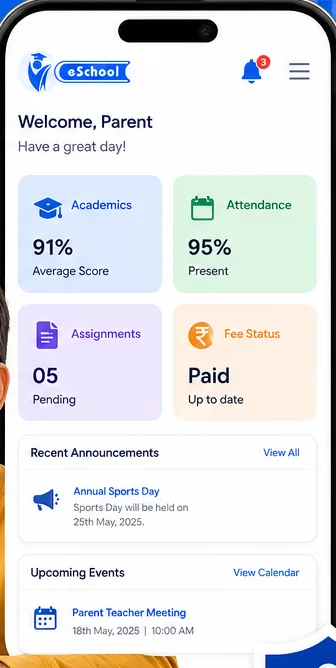
Reach families on the channels they already read — app, WhatsApp and SMS — and see what was delivered. No more notices lost at the bottom of a schoolbag.
Set up in one day · app, WhatsApp and SMS
What schools send through it
Notices and events
Holidays, parent-teacher meetings and school events, to everyone or one class.
Fee reminders
Automatic overdue notices tied to the fee module, so nobody chases by phone.
Absence alerts
Sent the same morning from attendance, without anyone writing a message.
Results and progress
Report cards and progress updates shared with the right families only.
Fewer calls to the office
Most calls a school receives are questions the parent could have answered themselves, if they’d been told.
- Reusable templates for the notices you send every term.
- Target by class, section or individual rather than messaging everyone.
- Delivery tracking, so you know a message landed before you follow up.
- Parents see their own child’s information only.

Automated Notifications
Send important reminders to parents, students, and staff effortlessly.
- Notify parents about fees, PTMs (Parent-Teacher Meetings), holidays, or special events.
- Schedule and send automated SMS or email reminders to reduce manual follow-ups.
- Personalize notifications for specific grades, departments, or groups.
- Keep everyone informed with a simple, centralized system.

Messaging and Group Emailing
Enhance communication with efficient messaging solutions.
- Instantly message parents, staff, or specific groups using in-built SMS and email tools.
- Broadcast important updates to a large audience with a few clicks.
- Save and reuse templates for recurring announcements or reminders.
- Track delivery status and ensure timely communication.
Why messages do not reach parents
Most schools already send plenty of messages. The problem is that they go out through whatever channel was convenient at the time — a note in a bag, a message to a class group, an app notification — and each of those reaches a different subset of families. Nobody can say afterwards who actually received a given notice, which means important information has to be sent several times through several routes to be safe.
Parent apps are worth being realistic about. A meaningful proportion of families will never install one, and those families are often the ones you most need to reach. A system that only speaks through an app quietly excludes them, and the office ends up phoning round to fill the gap.
What to check in a communication module
- Can you reach parents by WhatsApp and SMS as well as the app, so nobody is unreachable?
- Can routine messages — fee reminders, absence alerts — be triggered automatically rather than written each time?
- Can you message a class, a section or the whole school without rebuilding the list?
- Do messages come from the same records as everything else, so contact details are not maintained twice?
- Can teachers and the office both send, with appropriate permissions?
Choosing channels
In practice most schools end up using all three, deliberately: the app for anything with detail or history, WhatsApp for messages that need to be seen the same day, and SMS as the fallback that reaches everyone regardless of phone or data connection. The important thing is that one system drives all three, so a notice is composed once rather than three times.
The same channels carry absence alerts, fee reminders and transport notifications, so families are not asked to follow several different systems.
Common questions
Do parents need to install an app?
The app gives them the fullest view, but WhatsApp and SMS mean you can still reach families who haven’t installed it.
Can we message one class rather than everyone?
Yes. Send to the whole school, a class or section, or an individual family.
Can we tell whether a message was delivered?
Yes — delivery status is tracked, so you can follow up on the ones that didn’t land rather than resending to everybody.
Do we have to write every message ourselves?
Recurring notices can be saved as templates, and alerts from attendance and fees send themselves.
See how it reaches your parents
Book a demo and we’ll show messaging, templates and delivery tracking in practice.