
Fee management module
School Fee Management System
Collect fees online, issue receipts automatically, and chase overdue payments without anyone making phone calls. The office stops reconciling and starts reporting.
Set up in one day · works with payment gateways
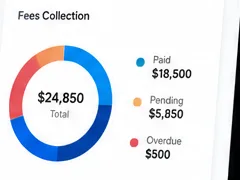
What the fee module handles
Fee structures
Set fees by class, term or category, including one-off charges.
Online collection
Payment gateway support so families can pay from home, any time.
Receipts
Issued automatically on payment — no handwritten books to reconcile.
Dues and reporting
See outstanding fees by class, student or term, in real time.
What changes in the office
Fee collection is usually the most manual job in a school. Automating it frees the front desk for work that needs a person.
- No cash counter queues at the start of every term.
- Receipts issue themselves, so nothing goes unrecorded.
- Overdue reminders go out on schedule rather than when someone remembers.
- Management can see collection status without asking for a report.
Why fee collection eats the end of every month
Fee collection is rarely difficult in principle. It becomes difficult because the work arrives in a lump, always in the same week, and because payments come in through several routes that have to be brought back together by hand. Cash at the counter, cheques, bank transfers and online payments each end up in a different record, and someone has to reconcile them before the school knows where it stands.
Reminders make it worse rather than better when they are manual. They are typed one at a time in the week the office has least capacity, so they are the first thing dropped — which pushes collection later, which makes the following month heavier.
What to check in a fee module
- Does an online payment post to the student’s account automatically, or does it still need entering by hand?
- Are cash and cheque payments recorded against the same account, so the outstanding list stays accurate however parents pay?
- Can reminders be scheduled by due date rather than sent manually?
- Is the outstanding list live, so you know the collection position on any day, not just at month end?
- Are receipts issued automatically rather than written out?
Before your next fee cycle
Define your fee heads and due dates once, properly — including concessions, siblings and any staggered structures you use — because everything downstream depends on that structure being right. Then set the reminder schedule and let it run. The practical test of whether it is working is whether reminders still go out during exam week, when nobody has time to send them by hand.
See an illustrative walkthrough of a fee cycle, or read about the payment gateways that collection runs through.
Common questions
Which payment methods can parents use?
eSchoolApp works with payment gateways, so parents pay by the methods your gateway supports. Tell us which provider you use or plan to use and we’ll confirm the fit.
Can we still accept payments at the school?
Yes. Payments taken at the office are recorded in the same place as online ones, so your dues report stays accurate either way.
How do reminders reach parents?
Through the parent app, WhatsApp and SMS — the channels families already check.
Can we handle different fee structures per class?
Yes — fees can be set by class, term or category, including one-off charges like trips or exam fees.
How long does it take to start collecting?
Setup takes one day, including your fee structure. See what determines pricing for what the module itself costs.
See it with your fee structure
Book a demo and we’ll set up a class and term the way your school charges.