
Introduction
Online fee collection is easy to demonstrate: a parent clicks Pay, chooses a method and completes the transaction.
The harder part happens after that.
Did the payment reach the correct student account? Was the right fee head adjusted? Was a receipt issued? What if the gateway says success but the ERP still shows pending? What if the parent tried twice? What if an offline payment was entered later?
That process is fee reconciliation.
For school accounts teams, good reconciliation can save more time than the payment screen itself.
On this page
- What Is School Fee Reconciliation?
- Why Payment Mismatches Happen
- The Ideal Online Fee Flow
- What the Accounts Team Should Review Daily
- Use Unique References
- Do Not Mark “Paid” Too Early
- Handle Failed Payments as a Parent Experience Problem
- Monthly Reconciliation Checklist
- Security and Access Controls
- How ERP Integration Changes the Work
- How eSchoolApp Can Be Evaluated
- Frequently Asked Questions
- Final Thoughts
What Is School Fee Reconciliation?
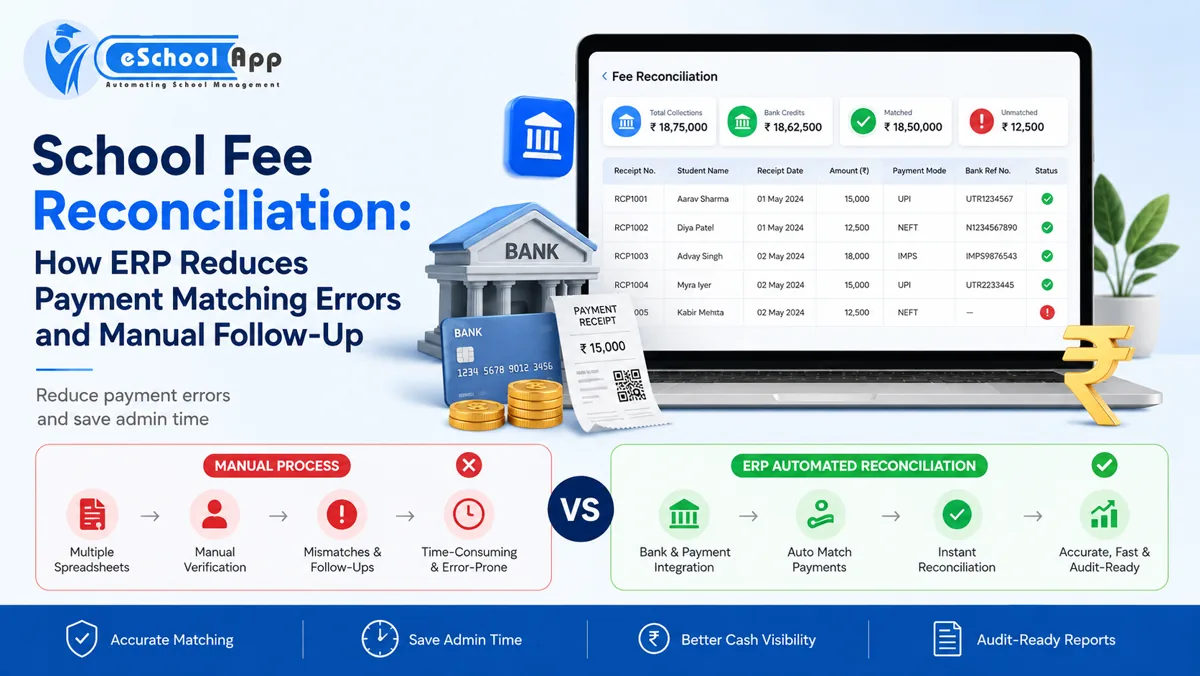
Fee reconciliation is the process of confirming that money reported by payment channels matches the school’s student-level fee records and, where relevant, settlement information.
At a simple level:
Parent payment → payment provider confirmation → student account posting → receipt → bank/settlement verification.
The goal is not only to prove that money arrived. It is to prove that the correct student’s ledger and the school’s financial record reflect the same event.
Why Payment Mismatches Happen
Common reasons include:
- Payment succeeded but confirmation did not reach the ERP
- Parent paid twice
- Transaction remained pending and later changed status
- Student identifier was missing or mapped incorrectly
- Payment was made against the wrong fee period
- Partial payment was allowed but not allocated correctly
- Offline payment was entered with the wrong date/reference
- Refund or reversal was not reflected everywhere
- Gateway settlement contains multiple transactions and deductions
- The parent used a different contact/account than expected
A good system does not pretend exceptions never happen. It makes them easy to find.
The Ideal Online Fee Flow
A well-integrated workflow looks like this:
- ERP creates the amount payable for the student.
- Parent starts payment from a linked student account or payment request.
- Gateway processes the transaction.
- Confirmed transaction returns a unique reference.
- ERP posts the payment to the correct student/fee item.
- Receipt is generated from confirmed status.
- Accounts team sees only exceptions needing review.
- Settlement/bank reports are reconciled according to the school’s accounting process.
The exact architecture depends on the payment provider, but the principle is consistent: avoid manual re-entry of successful transactions.
What the Accounts Team Should Review Daily
Instead of reviewing every payment, create an exception queue.
Daily categories may include:
Matched: no action.
Pending: waiting for final status.
Failed: parent may need retry guidance.
Duplicate/suspected duplicate: verify before adjustment or refund.
Unmatched: payment exists but cannot be mapped confidently.
Reversed/refunded: verify that the student account and accounting record are updated.
Manual/offline: ensure reference, date and authorization are complete.
This is a far better use of staff time than comparing two large spreadsheets line by line.
Use Unique References
Every digital payment should have traceable identifiers.
Store the payment/order reference provided by the integration and maintain the school’s own receipt/reference where applicable.
When a parent reports “money deducted but receipt not received,” staff should be able to search by transaction reference, student, date or amount instead of searching a bank statement manually.
Do Not Mark “Paid” Too Early
A common design mistake is treating payment initiation as payment success.
The student account should follow the status model agreed with the payment provider. If the transaction is pending, show pending. If final confirmation later changes the status, update it according to the integration workflow.
This prevents premature receipts and difficult reversals.
Handle Failed Payments as a Parent Experience Problem
Payment failure is not only an accounts issue.
Parents need a clear message: did the payment fail, remain pending, or succeed without a receipt? Should they retry now or wait?
Avoid sending automated “fee overdue” reminders immediately after an unresolved transaction if the system knows the payment is pending review.
Well-designed exception handling reduces both parent frustration and support calls.
Monthly Reconciliation Checklist
At month-end, review:
- Total amount recorded by the ERP
- Total successful digital transactions
- Gateway/settlement totals as applicable
- Offline/manual receipts
- Refunds/reversals
- Pending transactions carried forward
- Unmatched transactions
- Adjustments
- Outstanding student balances
Document unresolved exceptions with an owner and expected resolution date.
Security and Access Controls
Accounts users need payment information, but not every school employee does.
Use role permissions for fee reports and refunds. Protect payment-related exports. Keep audit trails for manual adjustments. Require appropriate approval for refunds or high-impact corrections.
For digital-payment disputes and provider responsibilities, schools should follow the procedures of their authorized payment partners and relevant RBI/payment-system guidance rather than inventing an internal rule.
How ERP Integration Changes the Work
The purpose of payment integration is to move staff from transaction entry to exception review.
If 98 successful payments require no manual action and 2 need investigation, the accounts team should work on the 2.
If the ERP still requires staff to download the gateway report and enter all 100 payments manually, the payment page is online but the back office is not automated.
How eSchoolApp Can Be Evaluated
eSchoolApp’s public integration and feature pages describe online fee collection with payments recorded against student accounts, along with receipts and reminders.
During a demo, test a complete payment workflow and ask specifically about pending, failed and duplicate transactions. The failure path is where reconciliation quality becomes visible.
Also pair this evaluation with the School ERP Integrations Guide and the School ERP Pricing article so that gateway charges and integration costs are understood separately.
Frequently Asked Questions
What is school fee reconciliation?
It is the process of matching payment-channel information with the correct student’s fee account and the school’s financial records.
Does online payment remove reconciliation completely?
No. It should automate the normal path and reduce manual work to exceptions, but failures, reversals and mismatches still need controls.
What is an unmatched payment?
A transaction exists but cannot be confidently linked to the correct student or fee item using the available data.
Should parents retry a pending payment?
The answer depends on the payment provider and current transaction status. The school should provide clear guidance based on the integrated status rather than guessing.
Can ERP automatically send receipts?
Many systems can generate receipts after confirmed payment, but schools should verify the exact workflow and accounting requirements.
Final Thoughts
School fee digitization is not complete when parents can pay online.
It is complete when the accounts team can trust that confirmed payments reach the correct student account, exceptions are visible and parent questions can be answered from a traceable transaction history.
Test reconciliation before you judge a fee module by its payment screen.