
Introduction
When a school searches for ERP software, one of the initial questions to ask is, “What is the School ERP pricing in India?”
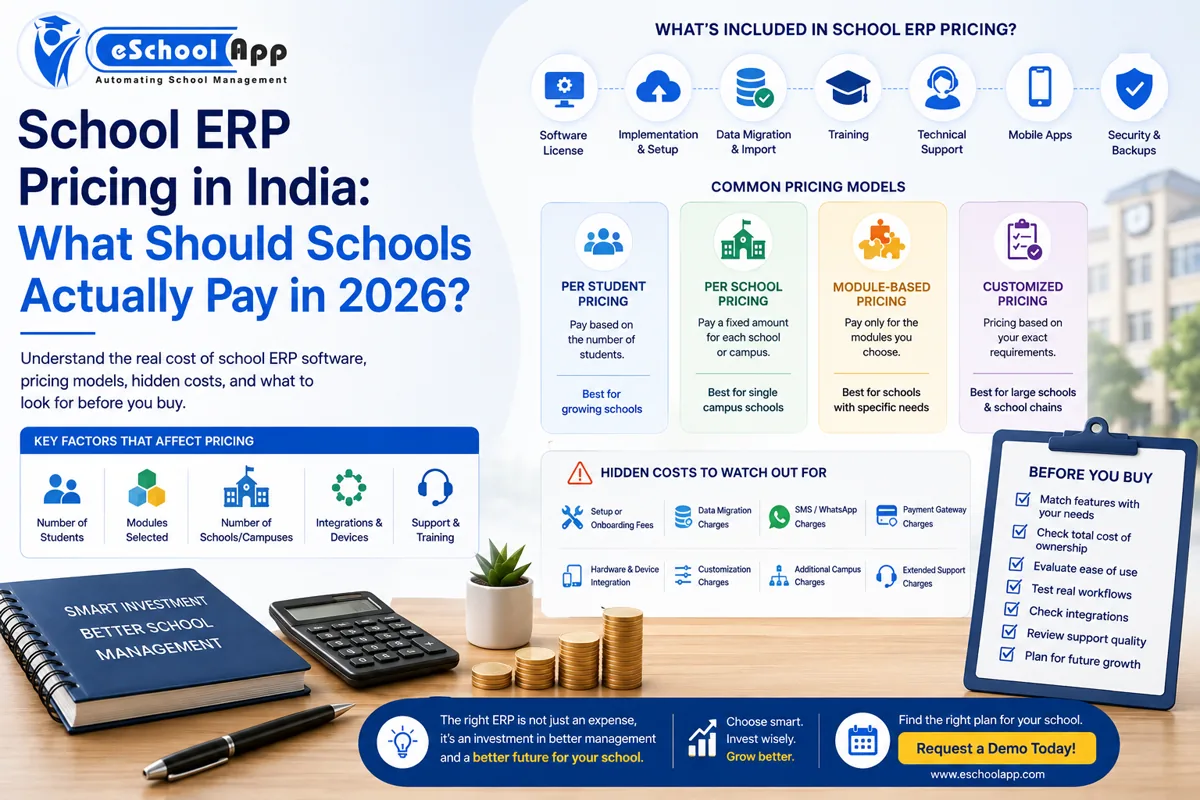
The price for school ERP software isn’t identical for all schools. It is based on the number of students, the needed modules, campus users, integrations, and campuses.
For example, a college with 400 students could require an elementary ERP that has basic functions. A school that has multiple campuses could require more advanced features such as multi-school management, centralised reports, fee management, attendance communications, and third-party integrations.
Instead of asking merely, “How much does ERP software for schools cost?”, schools should enquire:
“What is the School ERP total price in India, and what are the features included within that cost?”
This will help schools select the most appropriate ERP software, comprehend the total cost, and avoid costly expenses in the future.
This guide explains school ERP pricing in India, the main pricing models, possible additional costs, and what schools should compare before selecting a platform.
On this page
- How Much Does School ERP Software Cost?
- What Determines School ERP Pricing?
- Common School ERP Pricing Models
- What Should Be Included in School ERP Pricing?
- Hidden Costs Schools Should Check
- School ERP Cost Comparison: Look Beyond the Subscription
- How to Compare Two ERP Quotations
- Is a Cheap School ERP Really Cheaper?
- How eSchoolApp Pricing Works
- Frequently Asked Questions
- Final Thoughts
How Much Does School ERP Software Cost?
There isn’t any set School ERP Software Cost in India, as each school has its own needs. The final cost is based on a variety of aspects, including the number of students, the number of campuses or schools, ERP modules, user devices, integrations, customisation, and even support.
Certain ERP firms provide fixed pricing plans, whereas others offer a customised quote in accordance with the requirements of the school.
With eSchoolApp, the price is determined by the particular requirements of every school. Factors like the strength of students as well as selected modules, the size of the school, the number of devices, and integrations that are required may influence the final quote.
This is a good idea since a small school might require just basic ERP functions, whereas an entire school could require more advanced equipment and support. It is therefore better to evaluate the school ERP software cost against the features and services included in the bundle.
What Determines School ERP Pricing?
1. Number of Students
Student strength is one of the most common pricing factors. Ask whether pricing is per student, per school, per campus, per user or based on a customized quote.
2. Modules
Some schools require only core modules. Others may need admissions, fees, transport, library, inventory, payroll, LMS, online classes, advanced reports or multi-school management.
3. Number of Campuses
If a school group operates several campuses, the pricing structure may be different. Ask about separate campus systems, centralized dashboards, consolidated reporting and campus-level configuration.
4. Integrations
Payment gateways, WhatsApp, SMS, biometric systems, RFID, GPS, accounting software, APIs and website integration can affect total cost.
5. Customization
Some schools require customized forms, reports, permissions, notifications, fee structures or integrations. Ask whether these are included or charged separately.
Common School ERP Pricing Models
Per-Student Cost: The school charges according to the number of students. This is simple to grasp; however, costs could increase as student numbers grow.
Cost per School: A school pays a fixed amount per institution. Make it clear how campuses are considered.
Modular-Based Pricing: An institution chooses its modules and then pays for the functions it is activating. Verify whether essential features aren’t included in the overall price.
Customised Pricing: The seller creates a quote on the basis of the requirements. This is a great option for schools that have particular needs; however, you require an exact quote to make an honest comparison.
What Should Be Included in School ERP Pricing?
Before comparing prices, ask what is included.
Cost area
What to confirm
Core software
Included?
Student database
Included?
Parent app
Included?
Teacher access
Included?
Mobile applications
Included?
Setup
Included?
Data migration
Included?
Training
Included?
Payment gateway integration
Included?
SMS/WhatsApp
Included?
Biometric integration
Included?
GPS integration
Included?
Support
Included?
Reports
Included?
Backups
Included?
API access
Included?
Never assume a feature is included simply because the vendor website mentions it. Get it in the quotation.
Hidden Costs Schools Should Check
When looking at the School ERP Software Cost, schools shouldn’t just look at the base cost. Certain services could include additional charges. Before deciding on an ERP, make sure you are aware of these costs:
- Setup Costs: Ask if the ERP setup and implementation are included in the cost.
- Data Transfer Charges: Check if old fees, student attendance, student, and other school information are transferred without additional fees.
- Communication Costs: Ask whether SMS and WhatsApp costs are billed together or separately.
- Payment Gateway Charges: ERP integration might be included; however, the payment gateway could charge a fee for each transaction.
- Hardware cost: Devices such as biometric machines and RFID readers, as well as GPS trackers, could require being bought separately.
- Custom reports: Find out if the creation of custom or special reports is part of an ERP programme.
- Additional Cost for Campus: If your school plans to build a new campus, you should check if the ERP price will rise.
School ERP Cost Comparison: Look Beyond the Subscription
Consider two imaginary quotations.
ERP A has a lower annual subscription, but setup, mobile app, additional modules, migration and support cost extra.
ERP B has a higher annual subscription, but setup, parent app, core modules and support are included.
ERP B could have a higher headline price but a lower total cost.
This is why schools should calculate Total Cost of Ownership (TCO) rather than comparing only subscription prices.
How to Compare Two ERP Quotations
Ask both vendors to quote against exactly the same requirements.
Example school profile:
- 2,000 students
- 1 campus
- 150 staff
Required modules:
- Admissions
- Student management
- Fees
- Attendance
- Exams
- Parent app
- Teacher app
- Transport
- Inventory
- Library
Required integrations:
- Online payment
- WhatsApp/SMS
- Biometric
- GPS
Then compare.
This prevents a vendor from appearing cheaper simply because fewer components were included.
Is a Cheap School ERP Really Cheaper?
Not always.
Suppose a low-cost ERP requires administrators to spend additional time preparing reports, correcting records or sending messages manually.
The software subscription may be cheap, but the operational cost is higher.
Similarly, a system that requires expensive customization every year may not remain affordable over time.
The right question is:
How much administrative work does the ERP remove?
How eSchoolApp Pricing Works
eSchoolApp currently provides customized school quotations rather than a single fixed public price.
The pricing approach considers factors such as number of students, modules enabled, number of schools or campuses and devices or integrations.
Schools can discuss the modules they need and evaluate the appropriate setup rather than being forced into the same package as every other institution.
Request a quotation based on your actual school requirements: https://eschoolapp.com/pricing/
Final Thoughts
The most effective school ERP does not necessarily mean the one that has the lowest price. It is important to choose an ERP that offers your school the facilities, security, support, and integrations that it requires, with a predictable and clear price.
When you are comparing the School ERP prices in India examine the whole package. Make sure the cost includes data migration, implementation of mobile apps, communications and payment integrations, and customised reports, as well as customer support.
A thorough comparison will aid schools in choosing the most appropriate ERP system and keep out costly surprises in the future.
Are you looking for a school ERP quote that is based on your actual school’s requirements? Make contact with eSchoolApp for a discussion of your needs and to get a cost-effective pricing plan.
Request an eSchoolApp quote: https://eschoolapp.com/pricing/
What School Administrators Say About eSchoolApp Pricing
Template 1 — Value/ROI angle
“We evaluated 3 ERP vendors before settling on eSchoolApp. Pricing was straightforward right from the beginningwith no unexpected costs for setting up or moving later. This alone was a huge relief from the tense back-and-forth.”
— [Himanshu], [Teacher], [Gyan Vidya Mandir School], [New Delhi]
Template 2 Multi-campus angle
“Managing costs and attending across our two campuses used require two different systems. eSchoolApp offered us a single dashboard at a cost that was reasonable for our needs.”
— [Sonali], Principal, [Red Roses], [New Delhi]
Template 3 — Support/onboarding angle
“What impressed us was not just the price, but the value of what was included -the training, migration of data as well as support were all included in the package, and not additional lines of work.”
— [Manish], Administrator, [Sentia Public School ], [Hyderabad]
Template 4 — Growth/scaling angle
“We began with about 600 students. Since then, we’ve increased our enrollment. The cost of our plans grew to us, not forcing an annual plan change.”
— [Bhaskar], Director, [GD Goenka], [New Delhi]
Frequently Asked Questions
There’s no set cost. Costs are based on the strength of the students and the modules they choose, as well as the amount of campus and the integrations. Schools should request a custom estimate instead of using an average figure.
It differs by vendor. Some charge per student, others charge per school module-based, or fully custom pricing models.
It’s not always the case by default. Check with the vendor to determine if teacher and parent mobile apps are included with the price of the basic package or are charged separately.
Most likely, typically, not. In most cases, the ERP might incorporate payment integration; however, the payment gateway provider usually will charge its own transaction fee.
Often yes. Multi-campus pricing is determined by the number of campuses covered as well as whether central reports and dashboards are needed.